Termidesk on Habr
Part 1. Introduction to architecture and purpose
The Termidesk software product from the Russian developer LLC "UVEON — CLOUD TECHNOLOGIES" (part of the Astra Group of Companies) is designed to create virtual workplace infrastructures (VDI). In order to accelerate its development and provide a high level of customer service, Astra Group has planned a tenfold increase in the staff of specialized specialists, and therefore we conduct daily interviews for candidates for technical positions at all levels.
An interesting, but understandable feature came to light at the stage of their acquaintance with the structure of the virtual workplace infrastructure. Many people, having broad horizons and experience in technologies, protocols and solutions in the field of LDAP, FreeIPA, MS AD, Docker, vSphere, libvirt/KVM, oVirt, OpenNebula, OpenStack, SPICE, RDP and VNC, often do not always confidently understand the principles of building and the key differences between server virtualization platforms and a complete VDI infrastructure..
One of the factors of why this happens can be illustrated by the example of the development of server virtualization platforms themselves. It took system administrators a long time to accept the idea of putting all eggs services in one basket, but as technology developed and backup tools were used, such solutions began to find wider application.
Now, perhaps, there are no more examples where the new IT infrastructure relies entirely on the "1 server - 1 service" approach and the use of virtualization is de facto becoming an integral approach when building an enterprise—scale information and communication infrastructure.
We are sure that this will happen with VDI technology due to its ease of use and wide range of advantages. In the following example, we can see how trousers turn easily a user can access a workplace with a set of pre-installed software from any device from anywhere.
How, knowing and understanding the purpose of the constituent "bricks", to understand the complex picture? It may be advisable to go from the particular to the general, but for simplicity of perception, let's try the opposite and in comparison:
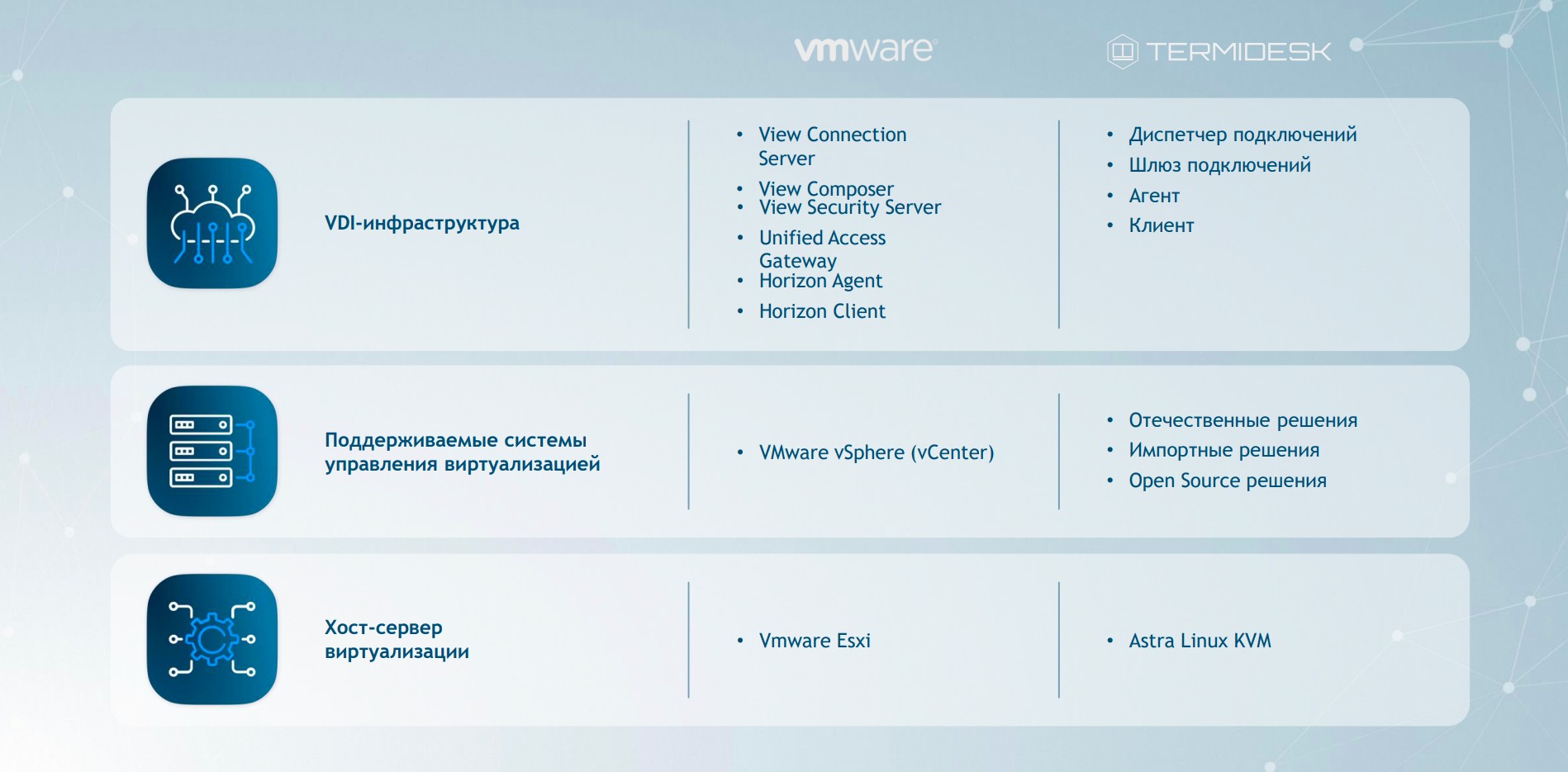
The picture shows an identical multi-level approach to building a virtual workplace infrastructure. But why is VDI not a monolithic product in the form of an EXE\MSI file?
The answer to this question is given in the recommendation of the International Telecommunication Union in the form of a description of the functional architecture of the DaaS (Desktop as a Service) model — workplace as a service.
It would also be appropriate to give a short fundamental difference of approaches:
-
DaaS is a service that provides remote access to virtualized workstations and applications;
-
VDI is a product that is deployed in an on—premises data center and, like DaaS, provides remote access to virtualized workstations and applications.
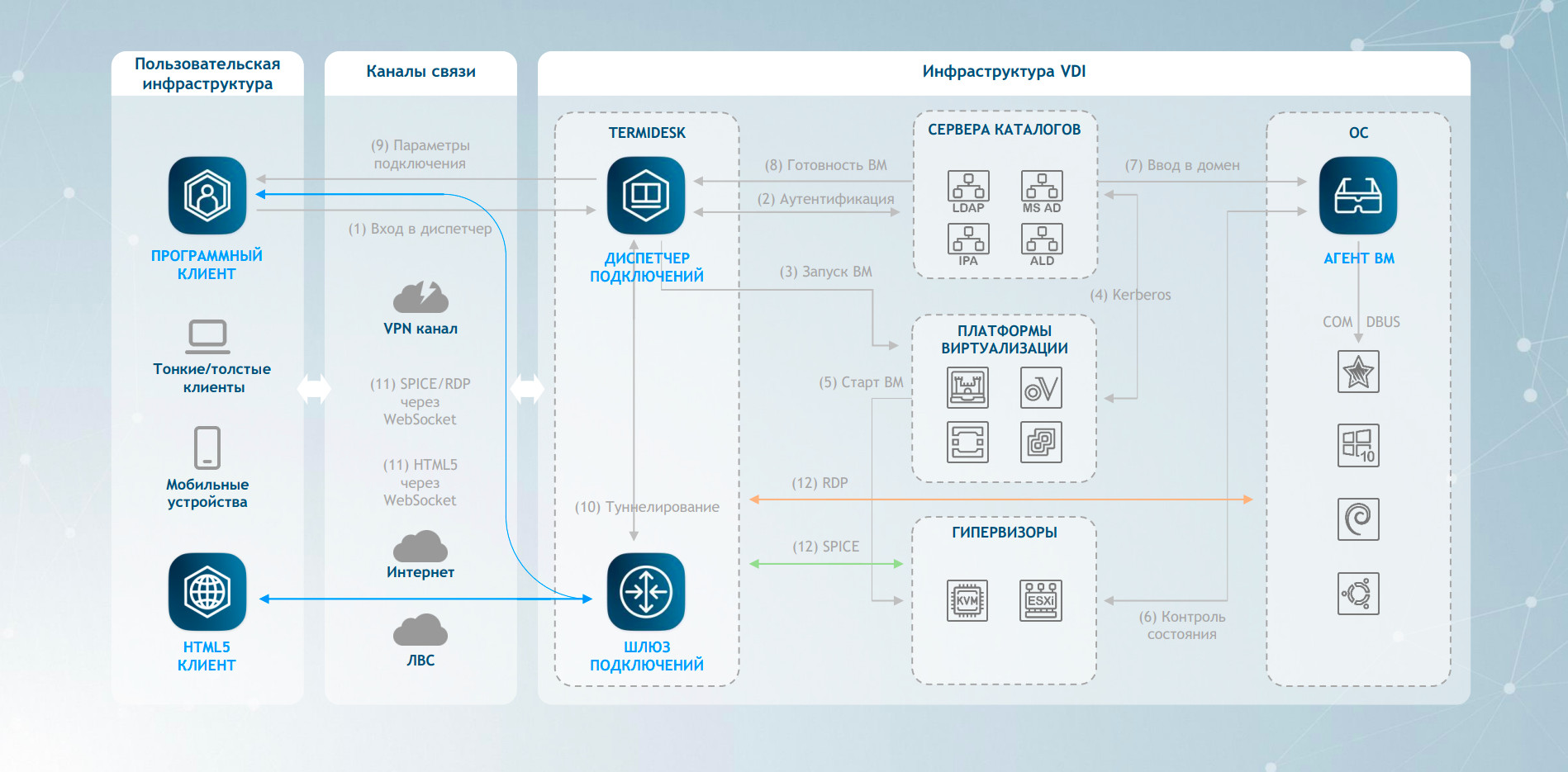
Connection Manager
The main task of the dispatcher is to provide the authorized user with his virtual workplace (VRM). The following functions are implemented for this purpose:
-
interaction with the service provider (virtualization platform) hosting the VM;
-
interaction with a local identification system or centralized directory services for user authentication and authorization procedures;
-
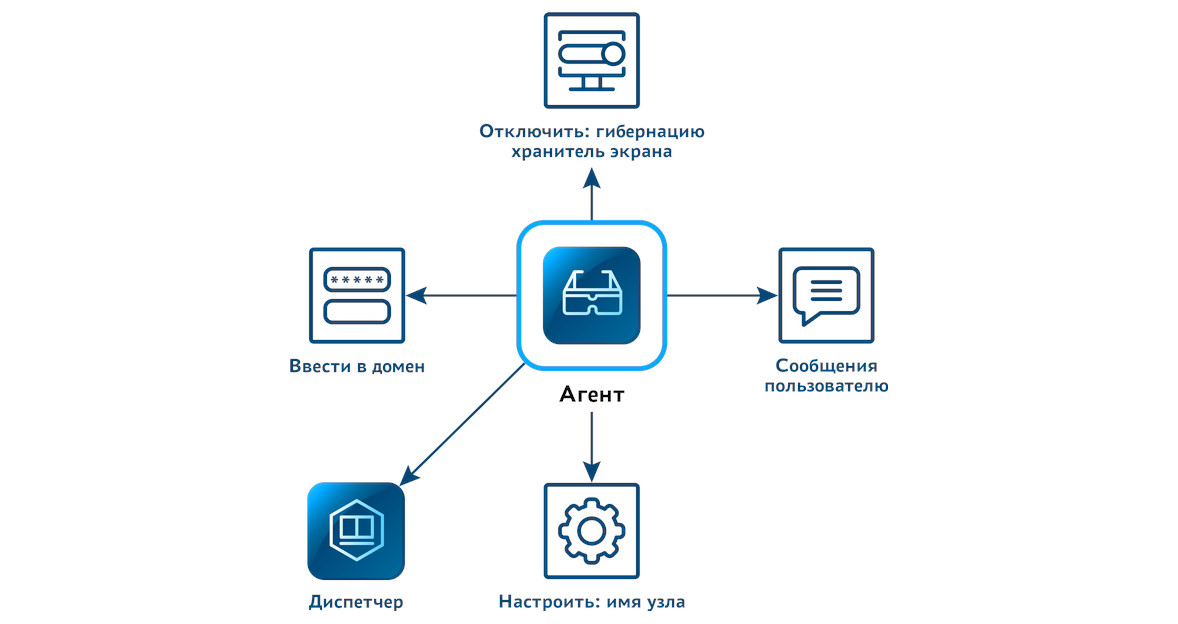
configuring the VM guest operating system (OS) in accordance with the specified parameters — changing the host name, entering the domain infrastructure;
-
maintaining the BPM lifecycle.
The dispatcher generates BPM funds in the following modes:
-
individual workstations — a separate virtual machine is created for the user, containing the necessary set of application software. The state of the VM is saved when the user exits;
-
collective workstations — based on the BPM template, a set of virtual machines with the necessary set of application software is created for several users. The user's data is not stored in the VM, and it is deleted after the user logs out. The VM is assigned to the first connected user.
The dispatcher is managed and configured via the graphical management interface and the command line.
Connection Gateway
The gateway provides isolation of the BPM infrastructure from the outside world by using one IPv4 address and one TCP port and can be installed together with the dispatcher or separately for scaling purposes.
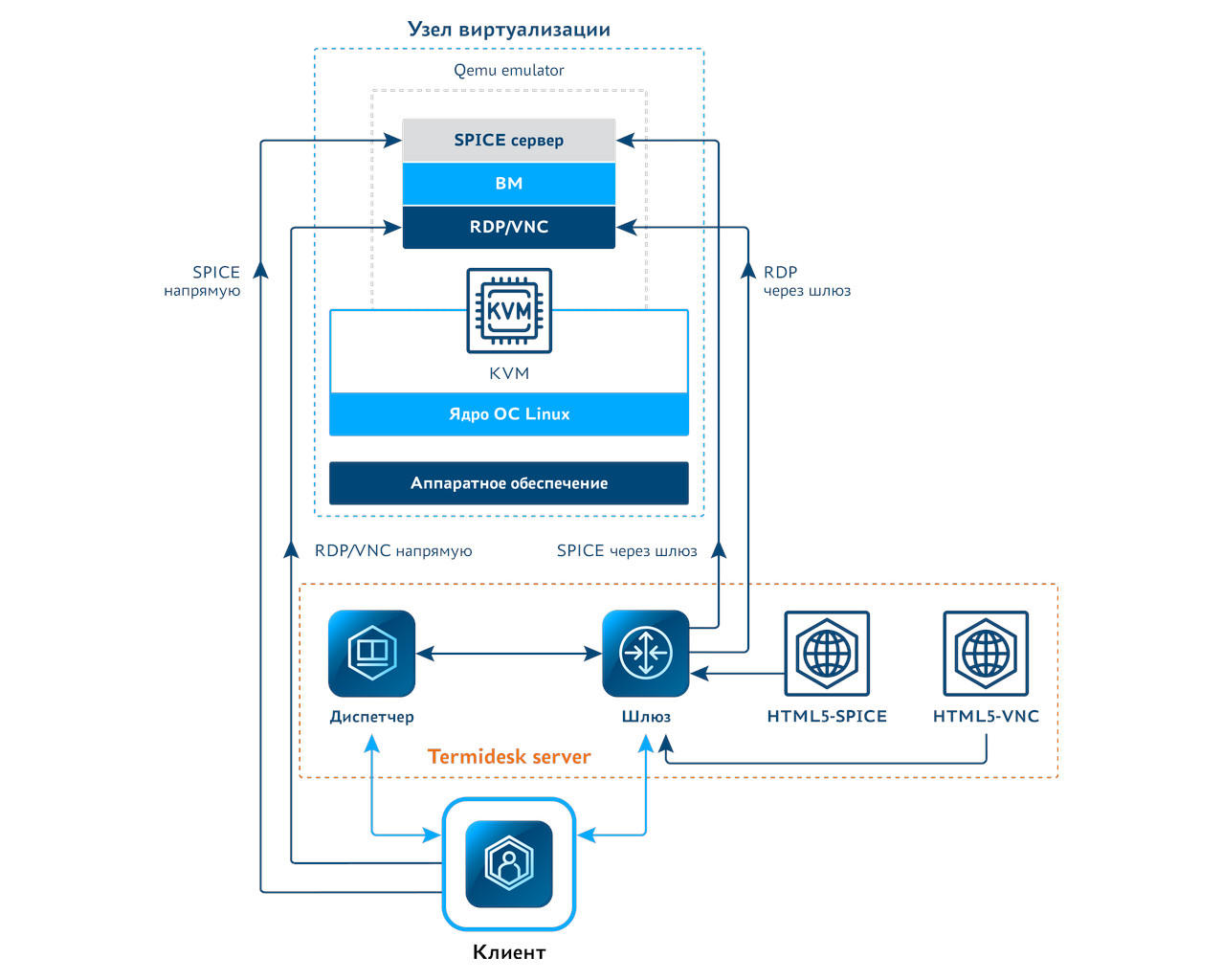
Guest OS Agent
This component is installed in the guest OS and, by exchanging data with the connection manager, allows flexible management of virtual workstations, maintaining two-way communication.
Connection Client
This program is installed on the user's computer, which can be a zero, thin or thick client running various operating systems. The program performs the tasks of connecting to the connection manager and launching the application for the selected delivery protocol.
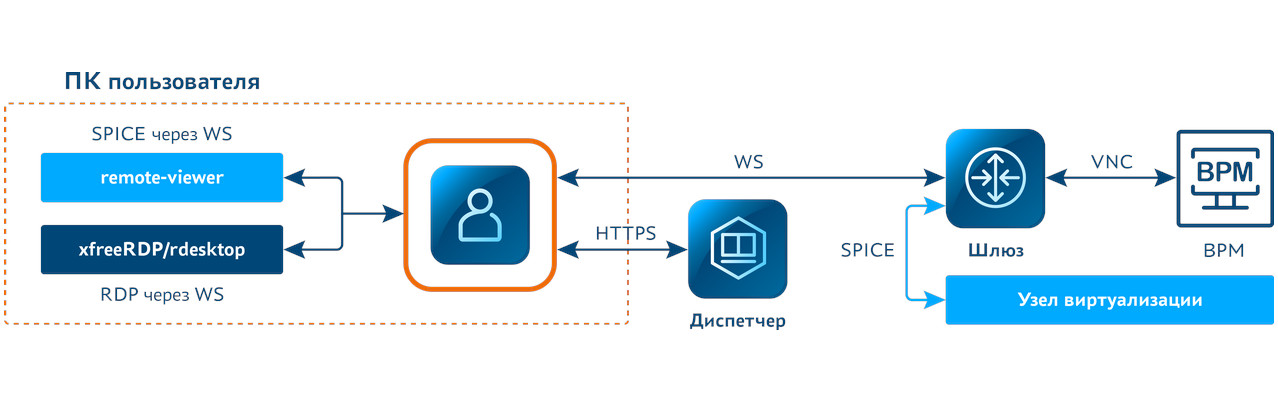
In this regard, any VDI product or DaaS service seems to be a comprehensive solution, where each component has its own significant role. For clarity, we present the following picture, which more clearly describes the relationship between the connection manager, delivery protocols, and support for interaction using the connection client and the guest operating system agent.
We plan to inform the community about the main developments and the specifics of their technical implementation in subsequent article cycles as part of our Termidesk development roadmap, which is released on a quarterly basis with a major release at the end of the calendar year.
The following components and functionality can be distinguished from the main developments of this year:
-
Termidesk Viewer is a component that has already been created to replace the Remote Viewer module. The implementation of this component makes it possible to optimize both the bandwidth and the quality of user experience when working with videoconferencing solutions.;
-
An application streamer is a component that allows you to deliver individual applications (Linux/Windows) and mount individual applications to the guest OS.;
-
The User Profile Manager is a component that allows you to explicitly separate user data from the image of the VM itself.
In the following example, we use the connection to the BPM using the connection client using the Termidesk Viewer component, on which you can observe bandwidth optimization when running through the video camera:
-
optimized work in the VCS for Termidesk Viewer (for example, about 1.5 Mbit/s);
-
forwarding the camera as a RAW device in BPM is used by default for the Remote (Virt) Viewer (for example, about 31.5 Mbit/s).
Real-time monitoring of network activity of outgoing traffic (from the connection device) for the video camera in the VRM is performed and displayed at the bottom of the screen using the iftop command.
The features of server virtualization infrastructure may vary significantly depending on the chosen solution. The Termidesk virtual desktop connection manager can interact with a wide range of solutions, including Brest PC, zVirt, VMware, Aerodisk vAir, oVirt, Openstack, and other cloud platforms offering DaaS services.
This concludes our brief overview of VDI/DaaS solutions using Termidesk as an example. In the following articles, we will delve deeper into the functionality of our product. See you soon!
And yes, we often use our own products both in our work and in our interviews. Therefore, if someone is interested in this area of development, we will be happy to meet you. Please contact us at info@uveon.ru and follow Astra Group's vacancies on HH or Habr.Career.
 Go back to the news list